When a wireless CarPlay adapter will not connect or keeps dropping out, the adapter itself is rarely the problem. In most cases the cause is a phone setting, the wrong USB port, interference or old firmware – all of which can be fixed in a few minutes. This guide lists the fixes in the order that solves problems fastest. It works for buyers, and it is a ready-made support script for sellers.
Before you start: confirm the basics
- The car has factory wired CarPlay (or wired Android Auto for 2-in-1 adapters). Test it with a phone and a cable first – see our compatibility guide.
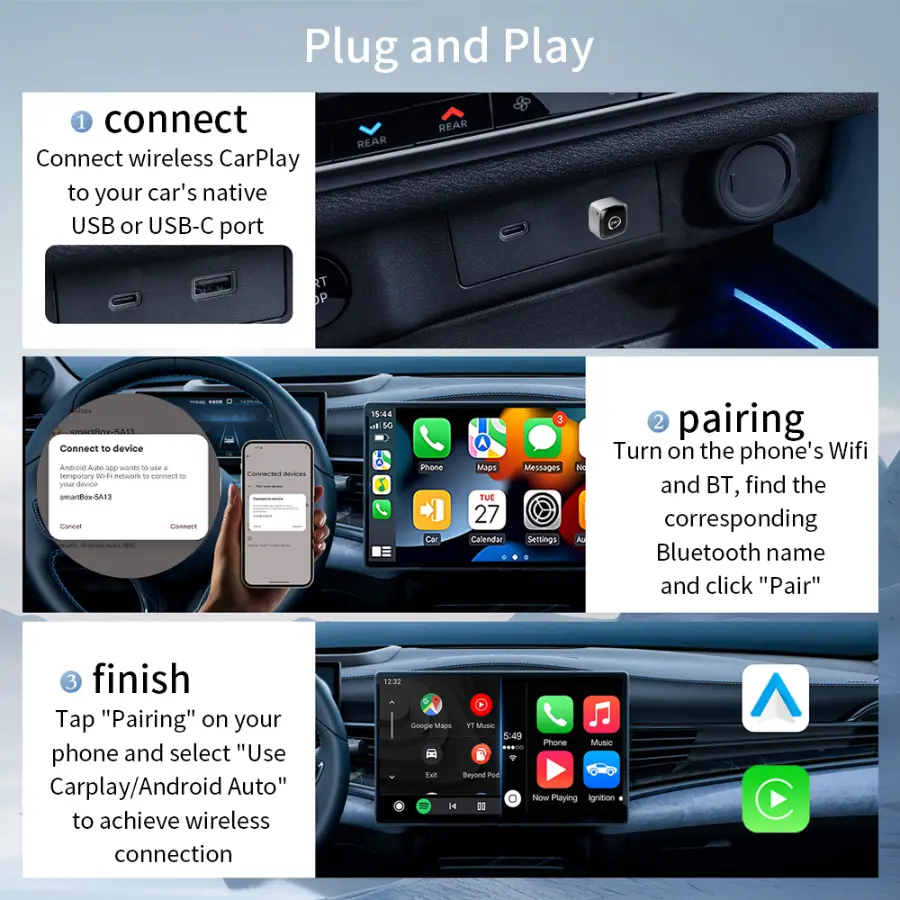
- The adapter is in the CarPlay USB port, not a charge-only port.
- The phone meets the requirements: iPhone 6 or later on iOS 10+, or Android 11+ for wireless Android Auto.
- WiFi and Bluetooth are both on. Wireless CarPlay pairs over Bluetooth and streams over 5 GHz WiFi.
Quick diagnosis
| Symptom | Most likely cause | Try first |
|---|---|---|
| Adapter light on, nothing on screen | Charge-only USB port | Fix 6: move it to the CarPlay port |
| Phone never finds the adapter | Siri off or CarPlay restricted | Fixes 1 and 2 |
| Connected once, will not reconnect | Old pairing record | Fix 3: forget the car and re-pair |
| Drops every few minutes | Interference or phone overheating | Fixes 4 and 9 |
| Reconnects after every engine start | Car cuts USB power while cranking | Normal – wait 20–40 seconds |
| Music plays but calls are silent | Phone also paired to car Bluetooth | Fix 12 |
| Noticeable audio delay | Wireless latency, old firmware | Fixes 8 and 11 |
| Android phone will not connect | Wireless Android Auto off | Fix 5 |
Fixes for iPhone
1. Turn on Siri
CarPlay needs Siri. Go to Settings > Siri (on some iOS versions, Siri & Search) and turn on "Press Side Button for Siri" and "Allow Siri When Locked". If Siri is fully off, CarPlay will not start.
2. Allow CarPlay in Screen Time
Screen Time restrictions can block CarPlay without any warning. Go to Settings > Screen Time > Content & Privacy Restrictions > Allowed Apps and make sure CarPlay is on.
3. Forget the car and pair again
Go to Settings > General > CarPlay, select the car (or the adapter) and tap "Forget This Car". Also remove the adapter from Settings > Bluetooth. Then unplug the adapter, plug it back in and pair from scratch. This clears most "connected once, never again" problems.
4. Keep WiFi and Bluetooth clear
Leave WiFi and Bluetooth switched on, and turn off any VPN while testing. Low Power Mode can also limit background connections – test with it off. If the phone is connected to a car-park or dashcam WiFi network, forget that network.
Fixes for Android Auto
5. Enable wireless Android Auto
Wireless Android Auto needs Android 11 or later. Open the Android Auto settings on the phone and make sure wireless Android Auto is enabled. On 2-in-1 adapters, connect only one phone at a time when you first set up each mode.
Fixes for the adapter and the car
6. Use the CarPlay USB port
If the adapter lights up but the screen shows nothing, try each USB port in the car. Only one usually carries CarPlay data. Use the converter that came with the adapter for USB-C ports.
7. Restart in the right order
Unplug the adapter, turn the car off and wait until the screen goes dark, then start the car, wait for the head unit to finish loading and plug the adapter back in. A clean restart fixes many one-off failures.
8. Update the adapter firmware
Adapters receive firmware updates that improve stability and fix issues after new iOS and Android releases. Follow the update method in the manual – our adapters support online updates. If problems start right after a phone update, a firmware update is the most likely fix.
9. Reduce interference and heat
Other devices on the same WiFi band, such as dashcams with hotspots or another adapter, can cause dropouts. Turn them off to test. A phone that overheats on a wireless charging pad in direct sun may also throttle its connections – move it off the pad for a test drive.
10. Switch modes cleanly on 2-in-1 adapters
If the adapter was last used with an iPhone and now needs to connect to an Android phone (or the reverse), forget the adapter on the previous phone first, or turn that phone's Bluetooth off. Otherwise the adapter may keep reconnecting to the old phone.
Fixing sound problems
11. Expect a small, stable delay
Wireless streaming adds a small delay compared with a cable. It should be stable and is rarely noticeable with music; it shows most when tapping the screen to skip tracks. If the delay grows or the sound stutters, update the firmware and check for interference (fixes 8 and 9).
12. Remove the phone from the car's own Bluetooth
If the phone is also paired directly to the car's Bluetooth system, calls and audio can be routed to the wrong place. Delete the phone from the car's Bluetooth device list and the car from the phone's Bluetooth list, then reconnect only through the adapter.
Write down the adapter's firmware version and the phone's iOS or Android version before contacting support. It speeds up every answer.
When it really is a hardware fault
- The adapter shows no light in any USB port in any car.
- It gets very hot within minutes and shuts down.
- It will not pair with any phone, even after a reset and a firmware update.
- There is visible damage to the plug or housing.
In these cases, contact the seller. Our products carry a 1-year warranty against manufacturing defects.
For sellers: cut support tickets and returns
- Ship a quick-start card with the compatibility test, the right USB port, the Siri and Screen Time settings and the forget-and-re-pair steps.
- Pin a 60-second setup video to the listing and the store page.
- Add this troubleshooting table to your FAQ and to your customer service replies.
- Ask one pre-sale question: the car's make, model and year.
- Keep firmware current: ask your supplier how quickly fixes follow major iOS updates. See our supplier checklist.
Selling adapters already? Ask us for a ready-to-print quick-start card with your logo.
Questions buyers ask
Why does my wireless CarPlay adapter keep disconnecting?
The most common causes are interference from other WiFi devices, a phone overheating on a wireless charger, Low Power Mode or a VPN, and outdated adapter firmware. Work through fixes 4, 8 and 9 first.
Why does CarPlay take a while to appear after I start the car?
Many cars cut USB power while the engine cranks, so the adapter restarts. It should reconnect within about 20–40 seconds.
Do I need Siri turned on for wireless CarPlay?
Yes. CarPlay needs Siri. Turn on "Press Side Button for Siri" and "Allow Siri When Locked".
Is some audio delay normal with a wireless adapter?
A small, stable delay is normal. A delay that grows, or stuttering sound, usually means interference or old firmware.
How do I update a wireless CarPlay adapter?
Follow the method in the manual. Our adapters support online firmware updates; the seller or supplier can guide you through it.